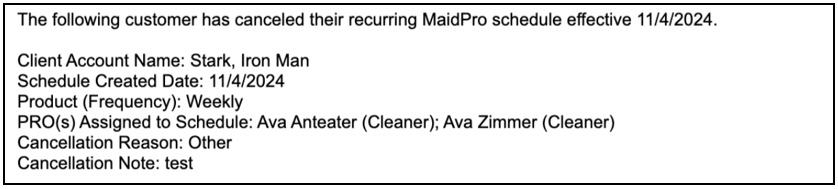
Upon cancelation of a Schedule, you will receive an email notification. The email notification will be sent to the email address associated with the office’s account. Typically, this is the group email address (ie boston.ma@maidpro.com). If you would like to confirm the email address, you can do this by following the steps below—
Click on your MyOffice(s) tab
Within the Account Details area (top of the page), in the Information section, you will find the email address associated with your account (right column). This is the email address that the cancelation notification will be sent to.

There is no change to the Schedule cancellation process. The only update is the addition of an email notification being sent after the cancelation. This notification will alert you and your office staff that a Schedule has been successfully canceled.
As a refresher, you can cancel a Schedule a couple of ways. Here are the steps—
Click on the blue ‘Active’ button next to the schedule reference number
Select the Cancel Schedule option from the dropdown
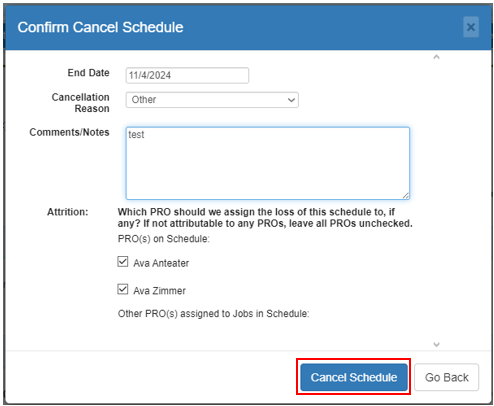
Fill out the Confirm Cancel Schedule pop-up

OR
Click on the Schedule reference number (next to the blue ‘Active’ button) to open the Schedule overview page
Click the Cancel Schedule button from the various buttons at the top of the overview page
Fill out the Confirm Cancel Schedule pop-up

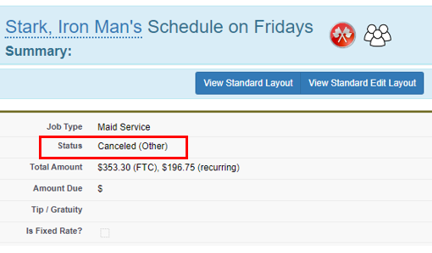
Once you fill out the cancelation details, click the Cancel Schedule button at the bottom of the pop-up box. You will then be brought back to the Schedule Overview page.
An email notification will follow. As previously stated, the notification will be sent to the office’s associated email address.
The Schedule cancellation notification email sent to you will be similar to the test email in the screenshot below.
If you have any questions, please do not hesitate to submit a case to the helpdesk team.
Was this article helpful?
That’s Great!
Thank you for your feedback
Sorry! We couldn't be helpful
Thank you for your feedback
Feedback sent
We appreciate your effort and will try to fix the article